
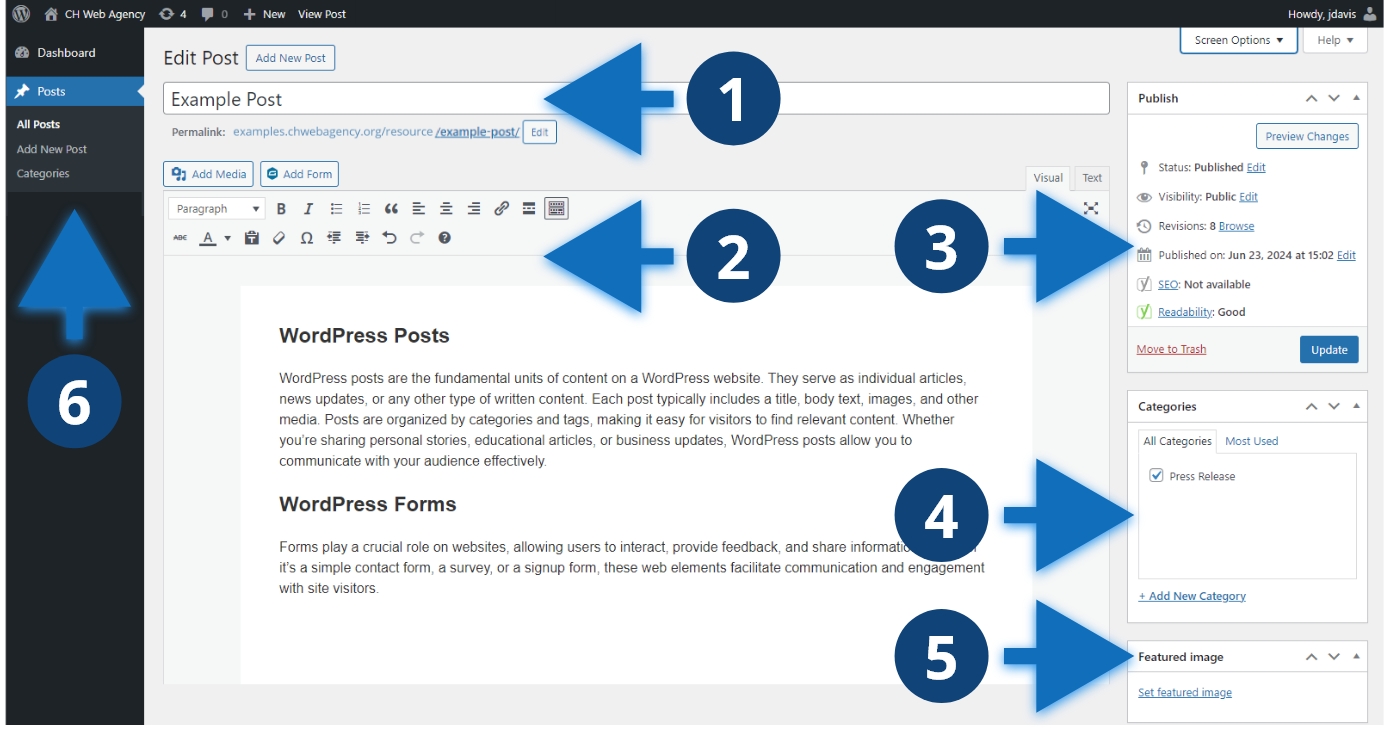
Key areas of the editor
- Title and permalink are where you set the name and URL of the post
- The WYSIWYG editor is the main editor for your content and allows you to add text, headings, links, and lists.
- The Publish Meta box includes settings for publish status, visibility, SEO, and readability.
- Terms, such as Categories, will show up in the sidebar. Terms help you organize your content.
- Featured image is an image that shows up on your blog page cards and at the top of the post.
Other considerations
The layout, fields, options, and terms available for your post editor will depend on your website’s setup. The layout shown is a common setup for our WordPress websites. You can show and hide sections and meta boxes by clicking the “Screen Options” toggle in the upper right corner of your window. You can also rearrange the sections of your editor by dragging sections and meta boxes.
